Quick Start
First connect PixelUI’s display, time, input, and rendering paths. Tickless is an optional low-power scheduling mode; validate its wakeup path on the target platform before enabling it.
1. Prepare dependencies
PixelUI depends on U8g2 and ETL. The main repository includes them as submodules:
1 | git clone --recursive https://github.com/Lawrence-Link/PixelUI.git |
The project uses C++20. PixelUI core disables exceptions and RTTI and defines ETL_NO_STL. Keep these compiler conditions consistent when integrating it into another build system.
Configure U8g2 and ETL first, and make sure your build environment can link the ETL library.
2. Test U8g2 by itself
PixelUI uses U8g2’s full-screen framebuffer. Before adding PixelUI, confirm that the underlying display works:
1 | u8g2.clearBuffer(); |
3. Create PixelUI
1 |
|
U8G2 must outlive PixelUI. This is normally straightforward in an embedded system. PixelUI contains the App arena and all managers inline, so global or static storage is usually more suitable than a small RTOS task stack.
Complete U8g2 hardware initialization before calling ui.begin(). begin() reads the actual display dimensions and initializes the Canvas display size and camera viewport. U8g2 initialization and the first App launch remain host responsibilities.
4. Understand how PixelUI runs
PixelUI is a host-driven UI library. It does not create its own thread, timer, or infinite loop. This makes it usable on bare metal, RTOS, and desktop simulators, but the platform must actively provide three things:
- Elapsed time: Animations, Popup timeouts, Coroutine delays, and page fades depend on an accurate internal timestamp. The timestamp is accumulated through ticking, called a heartbeat in the API.
- User actions: Key or encoder events enter through
handleInput()and are routed to Focus, Popup, and the current App. - Rendering requests: Call
markDirty()after state changes, then letrenderer()draw and send the U8g2 framebuffer when needed.
Why heartbeat is required
PixelUI cannot assume that every platform exposes the same clock API. The host passes real elapsed milliseconds to heartbeat(elapsedMs), or to tickFromISR(elapsedMs) in a timer ISR. These functions only provide time. renderer() advances due state and submits the framebuffer only when needed. See Event-driven rendering for complete semantics.
5. Connect the main loop
1 |
|
Simplest polling integration
On bare metal or a simple single-threaded system, dispatch input and attempt rendering in one loop while reading the system timestamp from an API similar to millis():
1 | uint32_t previous = platform_millis(); |
now - previous must be the real elapsed time. Do not always pass 16 just because the target is 60 FPS. If one loop actually takes 35 ms, pass 35 ms.
renderer() calls process() first and then decides whether a frame needs to be submitted.
6. RTOS and timer ISRs
In an RTOS or hardware-timer integration, the timer ISR and UI logic usually run in different contexts. Use tickFromISR() instead of heartbeat(): it only atomically accumulates time and may optionally wake the UI task. Widget, App, Popup, Animation, and navigation APIs still remain in one UI task:
1 | void timer_isr(uint32_t elapsedMs) { |
setTaskNotifyFromISR() installs a platform-specific ISR-safe wakeup function. Do not use both tickFromISR() and heartbeat() for the same elapsed interval, and do not call handleInput() or renderer() directly from an ISR.
The 16U passed to handler(16U) is the desired frame period, not elapsed time.
See Event-driven rendering for tickless deadlines and external event wakeups.
7. Refresh and wakeup
When does the display refresh?
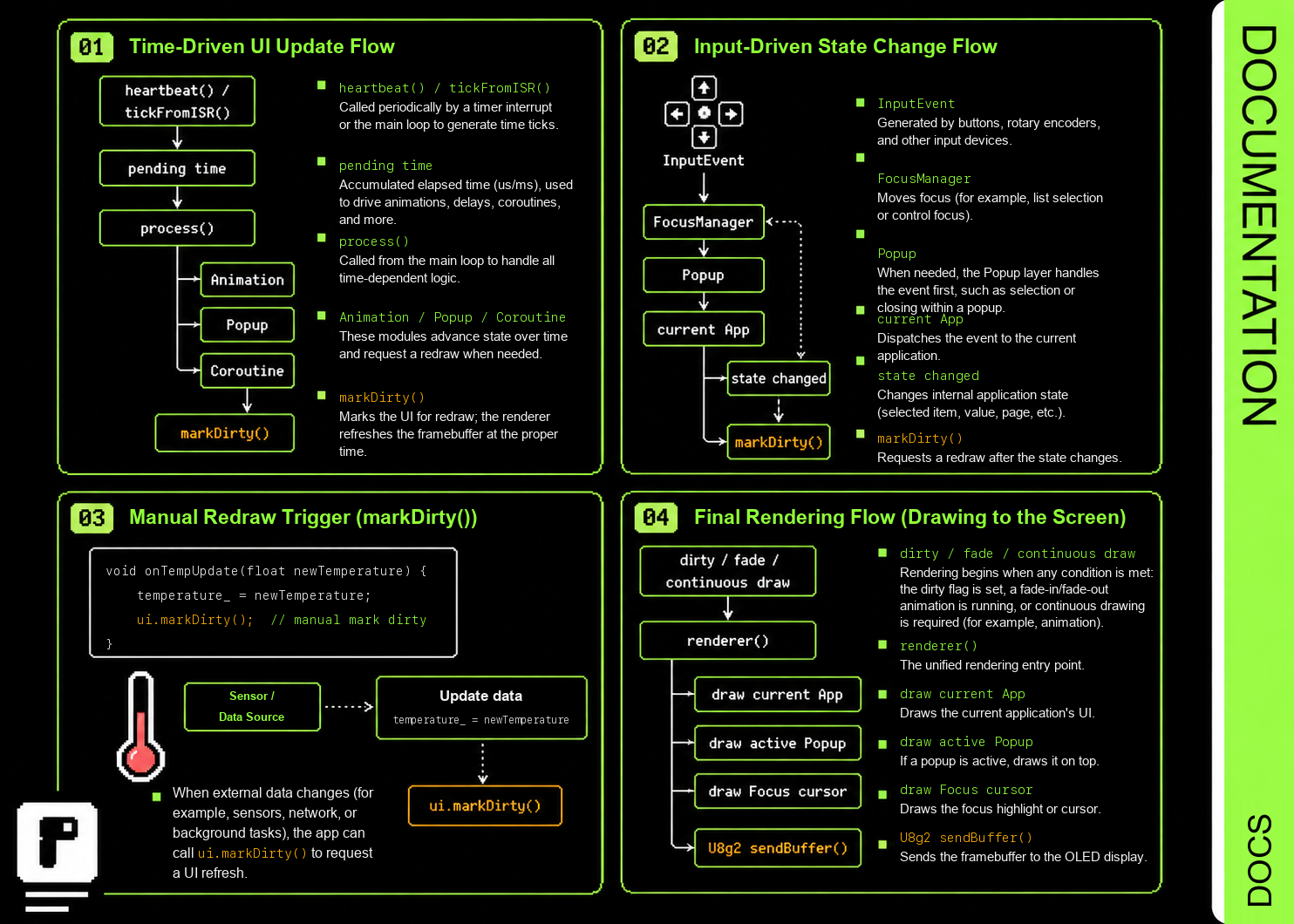
setRefreshCallback()notifies the host after a frame has been sent to the U8g2 buffer.setRenderRequestCallback()coalesces a wakeup when clean becomes dirty; the callback must not synchronously re-enterrenderer().markDirty()requests the next frame after application data changes.
8. Next step
A blank screen is normal when no App has been launched. Next, launch AppLauncher or build your first App. See Event-driven rendering for the complete scheduling model.